
Download CC Get MAC Address – Free, Secure MAC & IP Finder Tool
Overview
In today’s hyper‑connected world, knowing the exact hardware address of your device can be the difference between a smooth network experience and a frustrating one. CC Get MAC Address is a lightweight, user‑friendly utility that eliminates the guesswork when you need to locate your device’s MAC (Media Access Control) address, IPv4/IPv6 details, and even the network information of other devices on the same LAN. The application’s clean interface presents the required data in a single click, allowing both beginners and IT professionals to retrieve network identifiers without digging through multiple system dialogs or command‑line commands.
Whether you are troubleshooting a home Wi‑Fi issue, configuring static IP reservations on a router, or verifying that a device is correctly identified by a corporate network policy, CC Get MAC Address offers a reliable, fast, and secure solution. The tool runs locally, meaning no data is sent to external servers, preserving privacy while delivering instant results. Its minimal system footprint ensures that it can be installed on older machines without slowing down other processes.
In addition to displaying the local machine’s MAC and IP addresses, the app scans the local subnet and lists connected devices, making it a handy companion for small‑office network audits. The software is offered as a free download, with optional updates that keep the detection engine compatible with the latest operating system releases.
Key Features
- Instant display of local MAC, IPv4 and IPv6 addresses with a single click.
- Subnet scan that reveals MAC and IP details of all devices sharing the same network.
- Cross‑platform support for Windows, macOS, Android, and iOS.
- Secure, offline operation – no internet connection required for core functionality.
- Lightweight installer (under 5 MB) that does not affect system performance.
- Automatic update notifications to keep the detection engine current.
- Export option to save results as a text file or copy to clipboard.
- Multilingual interface (English, Spanish, French, German, Chinese).
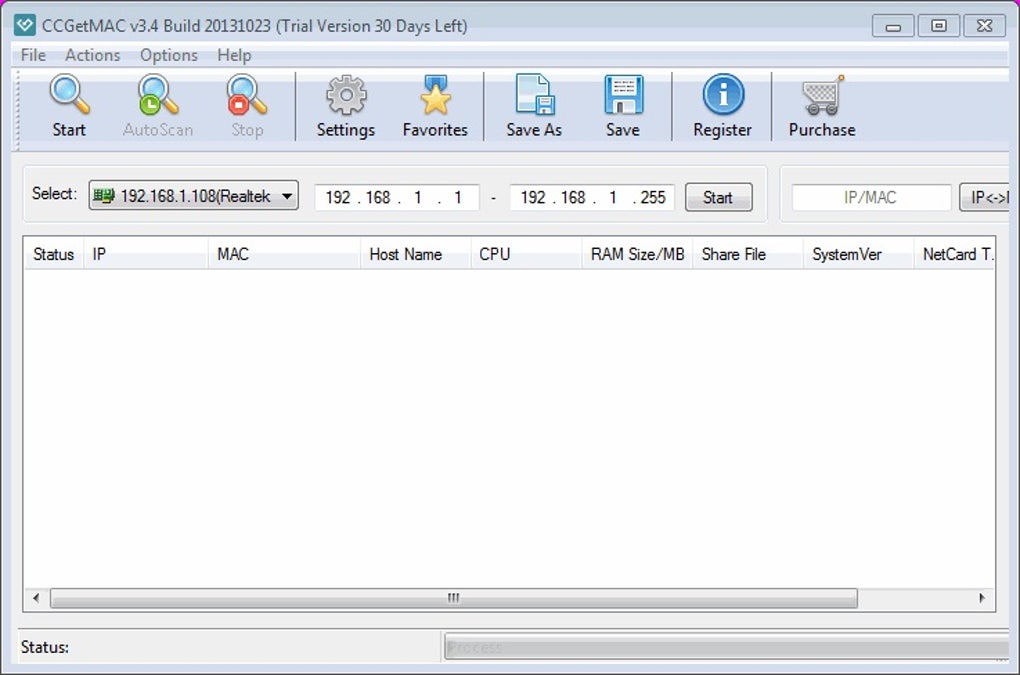
Each feature has been designed with practicality in mind. The instant display works by querying the operating system’s network stack directly, bypassing the need for complex commands like ipconfig or ifconfig. The subnet scanner uses ARP requests to map out devices, presenting the information in a sortable table that includes device name (if available), MAC address, IP address, and vendor identification based on the first three octets of the MAC.
This is particularly helpful when you need to identify rogue devices or verify that a new printer has been correctly added to the network. The cross‑platform nature ensures that the same experience is delivered whether you are on a Windows 10 desktop, a macOS Ventura laptop, an Android 12 tablet, or an iPhone running iOS 16. Updates are handled through a built‑in updater that checks for new releases once a week, guaranteeing compatibility with the latest OS security patches.
The export function lets you generate a concise report that can be attached to support tickets or saved for documentation purposes. Finally, the multilingual UI reduces the learning curve for non‑English speakers, making CC Get MAC Address a truly global tool.
Installation, Setup & Compatibility
Step‑by‑Step Installation Guide
Installing CC Get MAC Address is straightforward across all supported platforms. Below is a universal outline that adapts to each operating system:
- Download the installer: Visit the official website and click the “Download for Windows/macOS/Android/iOS” button. The file is signed with a trusted certificate to ensure authenticity.
- Run the installer: On Windows, double‑click the
.exefile; macOS users open the.dmgand drag the app to the Applications folder; Android users tap the.apkand allow installation from unknown sources if required; iOS users download the app directly from the App Store. - Accept permissions: The app requests permission to access the device’s network interfaces. This is necessary to read MAC and IP information. No external network access is performed.
- Complete setup: After installation, launch the program. The first run may display a brief tutorial overlay explaining the main button and the scan feature.
- Update check: The app automatically checks for updates. If a newer version is available, you will be prompted to download and install it.
Operating System Support
CC Get MAC Address is compatible with the following systems:
- Windows 7, 8, 8.1, 10, 11 (both 32‑bit and 64‑bit)
- macOS 10.12 (Sierra) through macOS 13 (Ventura)
- Android 5.0 (Lollipop) and later
- iOS 11 and later (iPhone, iPad)
The software leverages native APIs to retrieve network information, ensuring accurate results on each platform. For older operating systems (e.g., Windows 7), the installer includes legacy libraries that keep the detection engine functional without requiring additional patches. Mobile versions are optimized for touch interaction: a single tap reveals the device’s MAC address, while a swipe‑down gesture initiates a subnet scan. The Windows and macOS editions also support command‑line arguments for power users who prefer to integrate the tool into scripts or batch files.
Pros, Cons & Expert Review
Pros
- Instant, one‑click access to MAC and IP addresses.
- Subnetwork scanning without third‑party tools.
- Fully offline operation protects privacy.
- Small installer size and low memory footprint.
- Cross‑platform consistency and regular updates.
- Free to download with optional paid support for enterprises.
Cons
- Advanced network analysis (e.g., packet capture) is not included.
- Subnet scan may be limited to /24 networks on mobile devices due to OS restrictions.
- No built‑in DNS resolver; you must manually copy IPs for further lookup.
CC Get MAC Address delivers exactly what its name promises—quick and reliable access to hardware addresses across multiple platforms. The user interface is refreshingly simple; even users who have never opened a command prompt can locate their MAC address within seconds. The subnet scanning feature adds genuine value for small office environments, allowing administrators to spot unfamiliar devices without deploying heavyweight network scanners.
While the tool does not replace professional network analysis suites, its free price point and privacy‑first design make it an excellent companion for everyday troubleshooting. The few limitations, such as the lack of packet capture and minor scanning restrictions on mobile OSes, are understandable given the app’s focus on simplicity. Overall, it earns a solid four‑star rating for its stability, speed, and cross‑platform reach.
Frequently Asked Questions
What is a MAC address and why do I need it?
A MAC (Media Access Control) address is a unique 48‑bit identifier assigned to a network interface card (NIC). It is used by Ethernet and Wi‑Fi protocols to ensure that data packets reach the correct hardware on a local network. Knowing your MAC address is essential for tasks such as assigning static IPs on a router, setting up MAC‑based firewall rules, or troubleshooting connectivity issues where duplicate MAC addresses can cause conflicts.
Is CC Get MAC Address safe to use on corporate networks?
Yes. The application runs entirely locally and never transmits your hardware identifiers to external servers. This offline design meets most corporate security policies. However, always verify with your IT department before installing any third‑party software on managed devices.
Can I use the tool to find the MAC address of a device on a different subnet?
The built‑in subnet scanner works within the same broadcast domain (typically a /24 network). For devices on a different subnet you would need to run the tool on a gateway or use a more advanced network scanner that can route ARP requests across subnets.
Do I need an internet connection to update the software?
An internet connection is required only for downloading updates. The core functionality—retrieving MAC and IP addresses—works completely offline.
Is there a paid version with additional features?
The free version provides all essential features. A paid “Pro” license is available for enterprises that need centralized deployment, custom branding, and priority support, but the free edition is fully functional for personal and small‑office use.
Conclusion & Call to Action
If you’ve ever struggled to locate a MAC address or needed a quick glance at the devices sharing your Wi‑Fi, CC Get MAC Address offers a purpose‑built, no‑frills solution that works on every major platform. Its blend of speed, privacy, and cross‑device consistency makes it a valuable addition to any toolkit, whether you’re a home user, a small‑business IT manager, or a network hobbyist. Download the installer today, run a one‑click scan, and enjoy instant visibility into your network’s hardware identifiers—completely free and secure. For organizations that require extra support, consider the optional Pro license to streamline deployments across multiple workstations. Take the guesswork out of networking; get CC Get MAC Address now and keep your connections running smoothly.







